

SchoolFront Mobile App
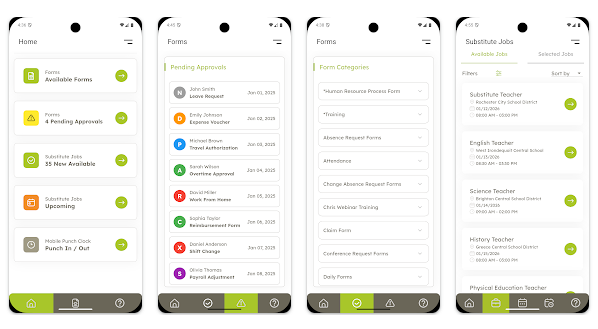
The SchoolFront Mobile App gives SchoolFront users a convenient way to access select parts of the SchoolFront system from a smartphone or other mobile device. It's a companion to the full SchoolFront web (desktop) application — not a replacement for it. Some users will prefer the larger interface of the classic web app for day-to-day work, and that's perfectly fine. The mobile app offers a simple, pared-down experience for the tasks users need most often, while on the go.
The app is entirely optional, completely free, and under active development, with additional features planned for future releases.
Download the App
Get the SchoolFront Mobile App for your device:
Android: Get it on Google Play
Need Help?
The SchoolFront Mobile App includes its own Knowledge Base and support ticketing system, separate from the main SchoolFront support channels. If you have questions about using the app or run into an issue, visit the SchoolFront Mobile App Support Portal: support.mobile.schoolfront.com
There you can browse help articles or submit a support ticket directly to the SchoolFront Mobile App team.
What You Can Do in the App
The SchoolFront Mobile App currently supports the following features. Availability of each feature depends on how your school district has configured SchoolFront and whether your district has granted you access — access is managed entirely by your district.
Clock In / Clock Out
Employees who use SchoolFront to clock in and out of work can do so directly from the app. This feature is only available if your school district uses SchoolFront to manage employee attendance and time tracking, and only after your district enables clock-in/clock-out access for your account. You're welcome to download the app now — if you're interested in using this feature, ask your district administrator to enable it for you.
Process Forms
Submit digital process forms available on SchoolFront right from your phone, just as you would on the desktop site. You'll also receive notifications when a process form is awaiting your review, so you can approve or reject submissions without needing to log in to the full web application.
Substitute Job Finding (Sub-Finding)
For districts that use SchoolFront to manage substitute staffing, substitutes can:
Receive immediate notifications when new substitute jobs become available
Accept or reject job offers
Manage their personal substitute schedule
Substitutes who work across multiple school districts using SchoolFront for substitute management can log in to all of their districts at once and view or manage every available and accepted job from a single, unified interface.
A Note on Access
The SchoolFront Mobile App is free for all users. However, which features you can use depends on your school district: your district must use the relevant SchoolFront functionality (attendance/clocking, process forms, or substitute management), and your district must grant you access to that functionality within SchoolFront. If a feature isn't available to you, contact your school district administrator.